IP cameras deliver higher resolution and smart features; CCTV cameras are simple, stable, and local.
If you are weighing ip camera vs cctv camera for your home or business, you are in the right place. I have evaluated, installed, and troubleshot both systems across homes, shops, and warehouses. In this guide, I break down ip camera vs cctv camera in plain language, using real examples and practical tips so you can choose with confidence.
What each camera type really means
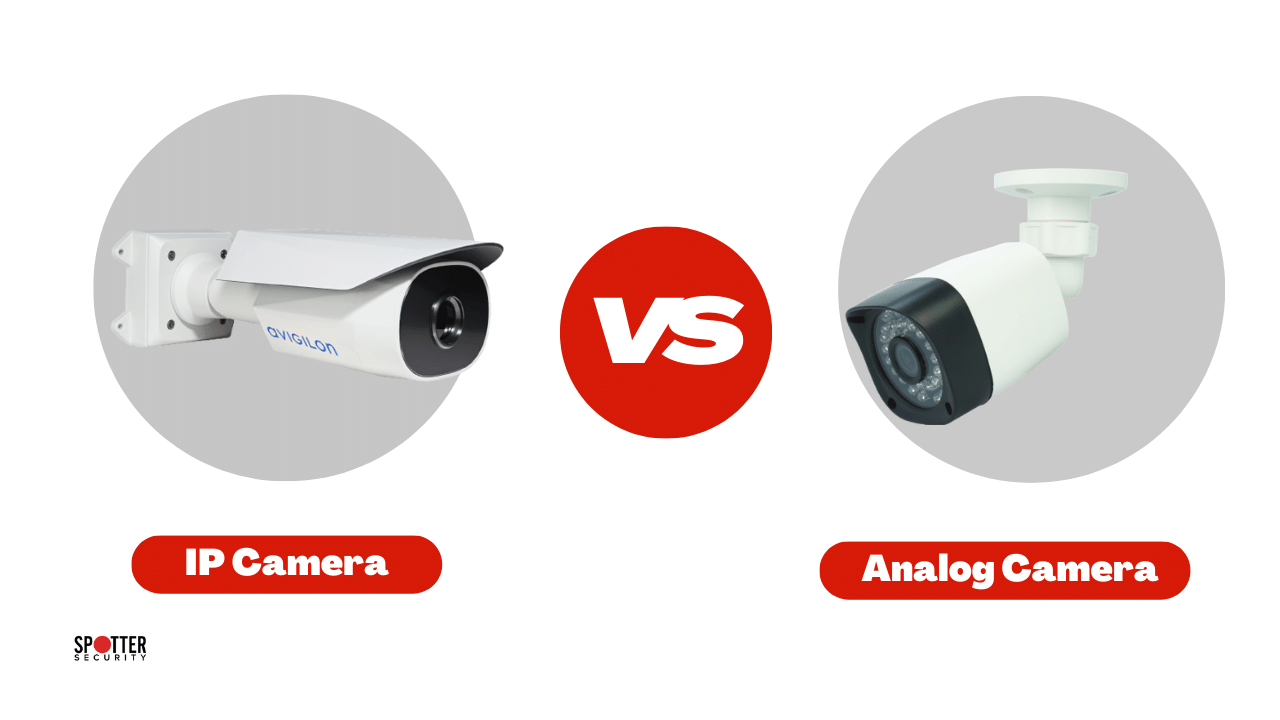
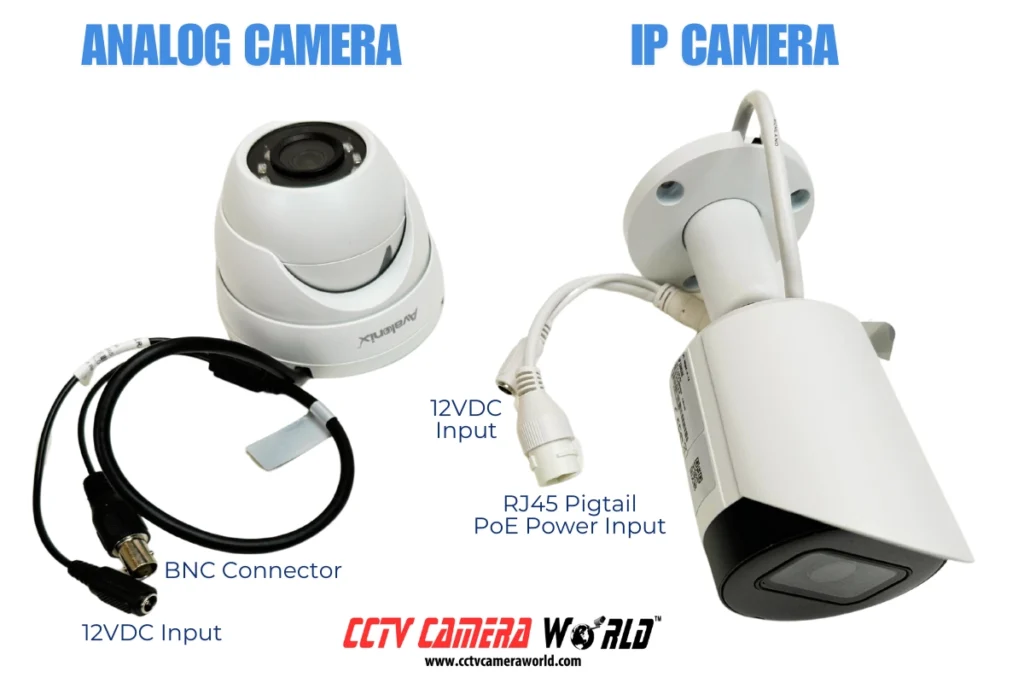
IP cameras are network devices. They send digital video over Ethernet or Wi‑Fi to a network video recorder or cloud. They support features like motion zones, AI detection, and remote viewing. You can power many models through a single cable using Power over Ethernet.
CCTV cameras are often analog. They send video over coaxial cable to a digital video recorder. The system is local, simple, and very stable. It is popular in places where internet access is weak or restricted. The ip camera vs cctv camera debate starts with this core difference: networked intelligence versus local simplicity.
Key differences that matter day to day
Here is what I ask clients to focus on when comparing ip camera vs cctv camera.
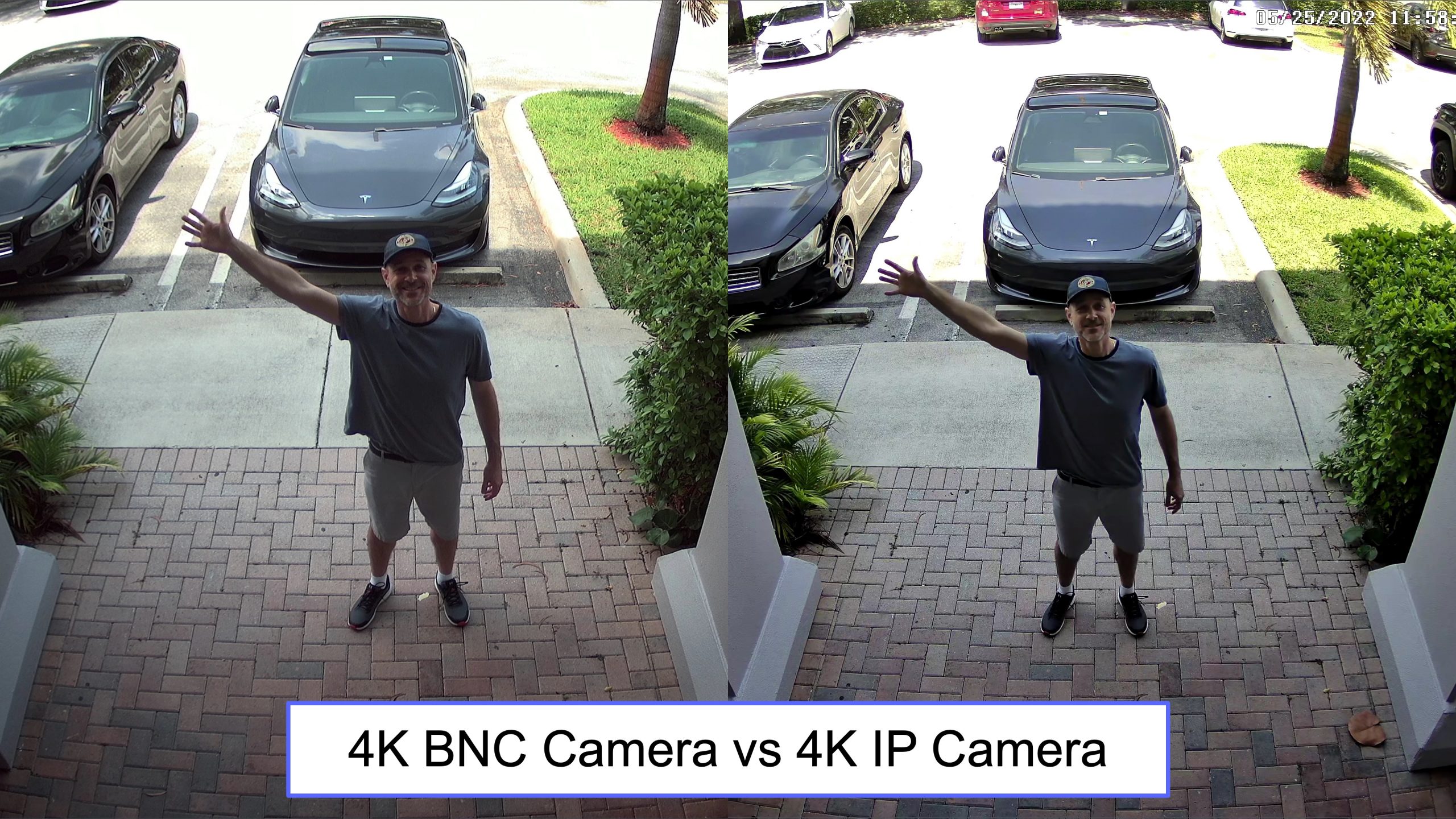
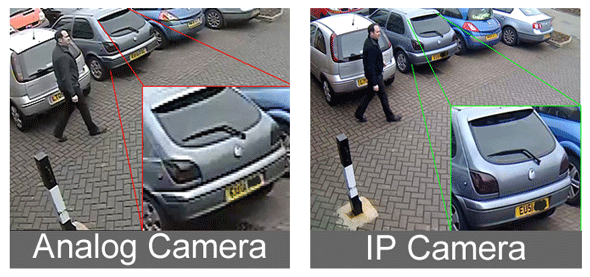
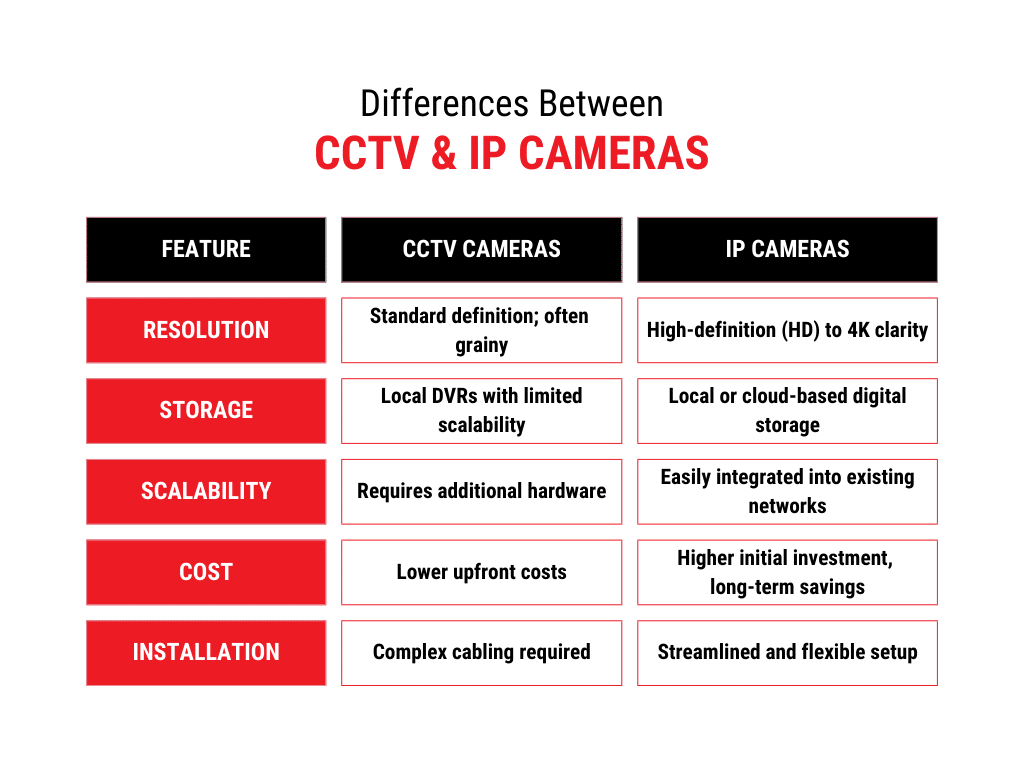
- Video quality. IP commonly reaches 4K and beyond with strong low‑light features. Analog HD over coax also reaches high resolutions, but dynamic range and detail are often better on IP.
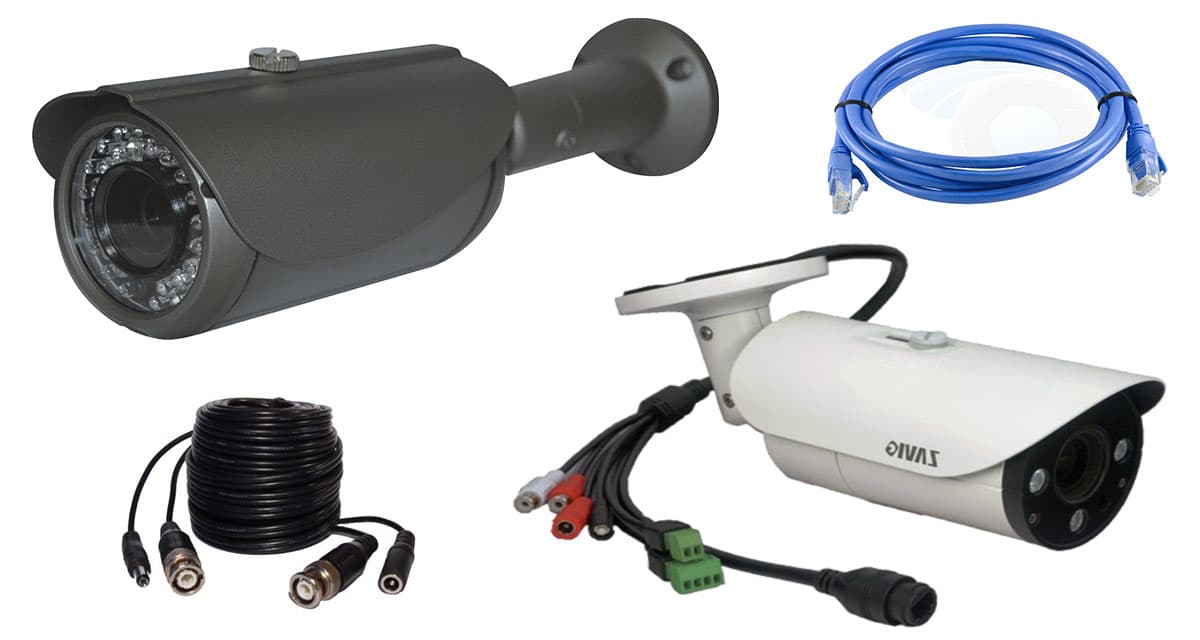
- Cabling and power. IP uses Ethernet and can use PoE. CCTV uses coax and usually a separate power line or a power hub.
- Storage and access. IP pairs with NVRs or cloud. CCTV uses DVRs and is often fully local.
- Smart features. IP excels with AI analytics, smart alerts, and easy app access. CCTV is more basic.
- Cost and scale. CCTV can be cheaper for small setups. IP scales better and is easier to expand.
When clients ask about ip camera vs cctv camera, these five points usually drive the final choice.
Pros and cons of IP cameras
IP cameras bring flexibility and modern features.
Pros
- High resolution with better dynamic range and night vision on many models.
- Smart analytics such as people detection, vehicle detection, and line crossing.
- Simple single‑cable PoE wiring and long transmission runs over Ethernet.
- Easy remote viewing through apps and secure web access.
Cons
- Needs basic network setup and security hardening.
- Consumes bandwidth and requires careful storage planning.
- Higher upfront cost for quality cameras and PoE switches.
From experience, ip camera vs cctv camera favors IP when you want quality images and smart alerts you can trust.
Pros and cons of CCTV cameras
CCTV systems are steady and local.
Pros
- Very stable and predictable once installed.
- Local storage with minimal network exposure.
- Lower cost for small systems and simple builds.
Cons
- Limited analytics and fewer smart features.
- Coax cabling can be bulky, and power runs add complexity.
- Upgrades often require new cameras or DVRs to reach higher resolution.
For basic coverage and tight budgets, the ip camera vs cctv camera choice may tilt to CCTV.
Cost breakdown and where money goes
When comparing ip camera vs cctv camera, price often leads the conversation. Here is a simple cost map based on typical projects I have delivered.
- Small home, 4 cameras. CCTV kits often cost less upfront. IP kits cost a bit more but offer better features and easier expansion.
- Medium office, 8 to 16 cameras. IP becomes more cost‑effective due to PoE switches, standardized cabling, and lower labor hours.
- Large sites, 24+ cameras. IP wins on scalability, central management, and flexible storage options.
Hidden costs surface in both camps. For IP, invest in a good PoE switch, quality NVR, and reliable drives. For CCTV, budget for power distribution, baluns if needed, and labor for coax runs. If you think long‑term, ip camera vs cctv camera costs often favor IP because it scales.
Installation and wiring basics
I have seen most installation issues start with wiring. Keep it simple and clean.
IP camera tips
- Use Cat6 Ethernet for cleaner runs and headroom.
- PoE makes power easy. Check power budgets on your switch.
- Label cables at both ends and keep a simple network map.
CCTV camera tips
- Use quality coax with solid copper and proper connectors.
- Keep power supplies neat and fused.
- Test every run with a portable monitor before final mounting.
If you want lower labor and faster troubleshooting, ip camera vs cctv camera often leans to IP because a single Ethernet run does both data and power.
Video quality, bandwidth, and storage planning
For IP, plan for bit rate and storage. It is simpler than it sounds.
- Typical 4K IP camera at H.265 may use 4 to 8 Mbps with motion events.
- A 1080p camera might average 1 to 3 Mbps.
- A 10‑camera system could need about 50 to 100 Mbps of LAN capacity and 8 to 16 TB for 30 days, depending on motion and frame rate.
For CCTV with DVRs, storage planning is straightforward because encoding happens at the DVR. Still, set realistic frame rates and motion settings. When deciding on ip camera vs cctv camera, IP gives you more control over codec, bit rate, and smart recording.

Security and privacy considerations
Security matters more than ever. Here is my standard checklist.
IP camera security
- Change default passwords and create unique admin accounts.
- Keep firmware updated and disable unused services.
- Use VLANs, strong Wi‑Fi security, and limit remote access through VPN or secure apps.
CCTV security
- Keep DVRs in a locked room and change defaults.
- Use strong local passwords and audit who has physical access.
- Consider separate power circuits and surge protection.
If your risk profile is higher, ip camera vs cctv camera pushes toward IP, provided you harden the network.
Best use cases and real‑world scenarios
From my projects, here is where each shines.
IP camera wins
- Retail with people counting and vehicle alerts.
- Parking lots needing license plate clarity at night.
- Homes that want smart alerts and clear faces at the door.
CCTV camera wins
- Rural properties with weak internet and long existing coax runs.
- Small shops that need simple recording and local playback.
- Legacy sites where re‑cabling is costly or disruptive.
When a client asks about ip camera vs cctv camera for a mixed site, I sometimes deploy a hybrid NVR that accepts both IP and coax inputs.
Scalability and future‑proofing
IP systems scale with switches and standardized protocols. Many support open standards, which protect you from vendor lock‑in. You can add analytics, cloud backup, and even third‑party AI services.
CCTV systems do scale, but jumps in resolution often require new hardware. If you plan to grow, ip camera vs cctv camera favors IP for future‑proofing.
A simple decision framework
Use this checklist to choose between ip camera vs cctv camera.
- Do you need smart alerts, remote viewing, or advanced analytics? Choose IP.
- Is your budget tight and needs basic recording only? Choose CCTV.
- Do you plan to expand the system within two years? Choose IP.
- Do you have existing coax in good shape? Consider CCTV or a hybrid NVR.
- Is internet unreliable or restricted? Choose CCTV or a local‑only IP setup.
When clients follow this checklist, ip camera vs cctv camera becomes a clear, low‑stress decision.
Field notes and lessons learned
A warehouse client wanted plate reads at night. We started with CCTV and saw noise and blur under weak lights. We moved to 4K IP with proper lenses and IR, and the results were crisp even in rain.
A small café wanted cheap coverage. We kept their coax, used a new DVR, and trained staff on simple playback. It was perfect for their needs. The ip camera vs cctv camera choice depends on goals, not trends.
Common mistakes to avoid
These errors can ruin a good plan.
- Ignoring lighting. Bad lighting defeats any camera. Add or tune lighting first.
- Wrong lens choices. Use varifocal lenses for gates, doors, and long corridors.
- Overlooking network basics. For IP, check switch power budgets and cable quality.
- Poor mounting angles. Aim for faces and plates, not just wide scenes.
- Default settings. Tweak bit rate, WDR, and motion zones. Small tweaks help a lot.
Address these and your ip camera vs cctv camera setup will perform far better.
Step‑by‑step: From plan to install
Follow this quick path for a smooth build.
- Define goals. What do you need to see and when.
- Walk the site. Note cable paths, power, and lighting.
- Choose system. Decide on ip camera vs cctv camera based on needs and budget.
- Size storage. Pick days of retention and frame rates.
- Install cleanly. Label, test, and document everything.
This sequence keeps projects on time and avoids rework.
Frequently Asked Questions of ip camera vs cctv camera
Which is better for home use, IP or CCTV?
IP is better if you want smart alerts and clear remote access. CCTV is fine for simple, local recording on a tight budget.
Do IP cameras work without internet?
Yes, IP cameras can record to a local NVR without internet. You only need internet for remote viewing or cloud backups.
Can I mix IP and CCTV cameras?
Yes, many hybrid DVRs and NVRs accept both types. This helps you reuse existing coax while adding new IP cameras.
How much storage do I need?
It depends on camera count, resolution, and motion. Many 8‑camera systems run well on 4 to 8 TB for 2 to 4 weeks.
Are IP cameras harder to secure?
They require basic network hygiene, like strong passwords and updates. With simple steps, they can be very secure.
Conclusion
Choosing between ip camera vs cctv camera comes down to goals, growth plans, and comfort with networks. IP brings better images, smart analytics, and easy scaling. CCTV delivers local simplicity and steady performance when you just need the basics.
Take a short site walk, list your must‑see moments, and test one or two cameras before you commit. The right ip camera vs cctv camera choice will save you time, money, and stress. If this helped, subscribe for more practical security guides or drop your questions in the comments.