Installing a CCTV system can be easy if you know the right parts. Two important parts are connectors and cables. They help your cameras work well. If you are new to CCTV, this guide will help you understand these parts. It will explain what they do and how to choose the best ones.
What Are CCTV Connectors?
Connectors join cables to cameras and other devices. They make sure the signal moves from one place to another. Without connectors, the camera cannot send videos to the monitor or recorder.
There are many types of connectors. Each type fits different cables and cameras. The right connector keeps your system working smoothly.
Common Cctv Connectors
- BNC Connector: Most popular for CCTV. It connects coaxial cables. It clicks and stays tight.
- DC Power Connector: Supplies power to cameras. Usually a small round plug.
- RJ45 Connector: Used for network cables. Connects IP cameras to the internet or network.
- HDMI Connector: Sends high-quality video to monitors.

Credit: www.amazon.com
What Are CCTV Cables?
Cables are wires that carry signals and power. They link cameras to the recorder and power source. Using the right cable is very important. It affects video quality and camera performance.
Types Of Cctv Cables
| Cable Type | Use | Features |
|---|---|---|
| Coaxial Cable | Analog CCTV cameras | Good video quality, easy to install |
| UTP (Cat5/Cat6) Cable | IP cameras, digital signals | Fast data transfer, supports power over Ethernet |
| Power Cable | Supply power to cameras | Usually 18 or 20 gauge wire |
| HDMI Cable | Connect camera system to monitor | High-definition video and audio |
How to Choose the Right Connector and Cable
Choosing the right connector and cable depends on your CCTV system type. Let’s look at some simple steps.
1. Know Your Camera Type
Is your camera analog or digital? Analog cameras use coaxial cables and BNC connectors. IP cameras use UTP cables and RJ45 connectors.
2. Check Cable Length
Measure the distance between your camera and recorder. Use cables that are long enough but not too long. Long cables can cause signal loss.
3. Match Connectors To Cables
Make sure connectors fit the cables you choose. For example, BNC connectors work with coaxial cables only. RJ45 connectors go with UTP cables.
4. Consider Power Needs
Cameras need power to work. Some use separate power cables. Others get power through Ethernet (PoE). Choose cables and connectors that meet power needs.
How to Connect CCTV Cables and Connectors
Connecting cables and connectors is simple. Follow these easy steps.
- Strip the cable end to show the wires inside.
- Attach the connector to the cable wires carefully.
- Make sure the connector is tight and secure.
- Connect the cable to the camera or device.
- Test the connection by turning on the camera.
If the video shows clearly, you did it right. If not, check the connectors and cables again.
Tips for Using CCTV Connectors and Cables
- Buy Quality Parts: Cheap connectors and cables can cause problems.
- Keep Cables Neat: Use clips or ties to organize cables.
- Protect from Weather: Use waterproof connectors for outdoor cameras.
- Avoid Sharp Bends: Bending cables too much can damage them.
- Label Cables: It helps when you have many cameras.
Why Are Connectors and Cables Important?
Good connectors and cables make your CCTV system work well. They send clear video and steady power. Bad cables cause weak signals or no video at all. Good parts save money and time. They reduce the need for repairs.
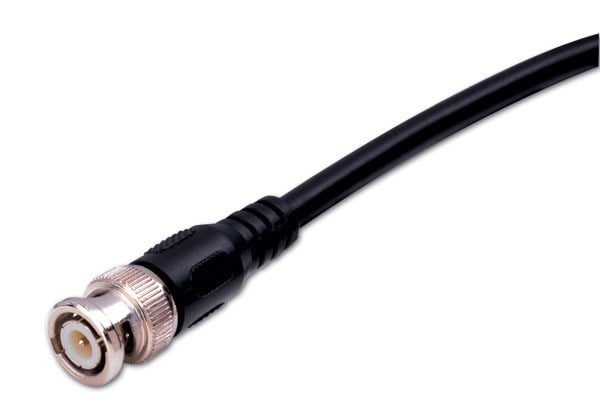
Credit: www.vanco1.com
Summary
Connectors and cables are key parts of any CCTV system. Connectors join cables to devices. Cables carry video and power signals. Choose the right type based on your camera. Use good quality parts for best results. Follow simple steps to connect them properly. Keep cables neat and protected. This will help your CCTV system work smoothly and last longer.
Frequently Asked Questions
What Are The Main Types Of Cctv Connectors?
CCTV connectors include BNC, RCA, and DC connectors, used for video and power connections.
Which Cable Is Best For Cctv Cameras?
Coaxial cable is common for analog CCTV; Ethernet cable suits IP cameras.
How To Choose The Right Cctv Cable Length?
Measure the distance between camera and recorder, add extra for flexibility.
Can I Use Regular Tv Cables For Cctv?
Regular TV cables might work but are not ideal for CCTV video quality.