Local NVR gives control and speed; cloud NVR gives scale and ease.
Choosing between Local NVR vs cloud NVR is not just about storage. It affects cost, uptime, privacy, and growth. I have helped homes, shops, campuses, and factories deploy both. In this guide, I will break down Local NVR vs cloud NVR with clear steps, real stories, and plain words so you can pick with confidence.
What is an NVR and how each model works
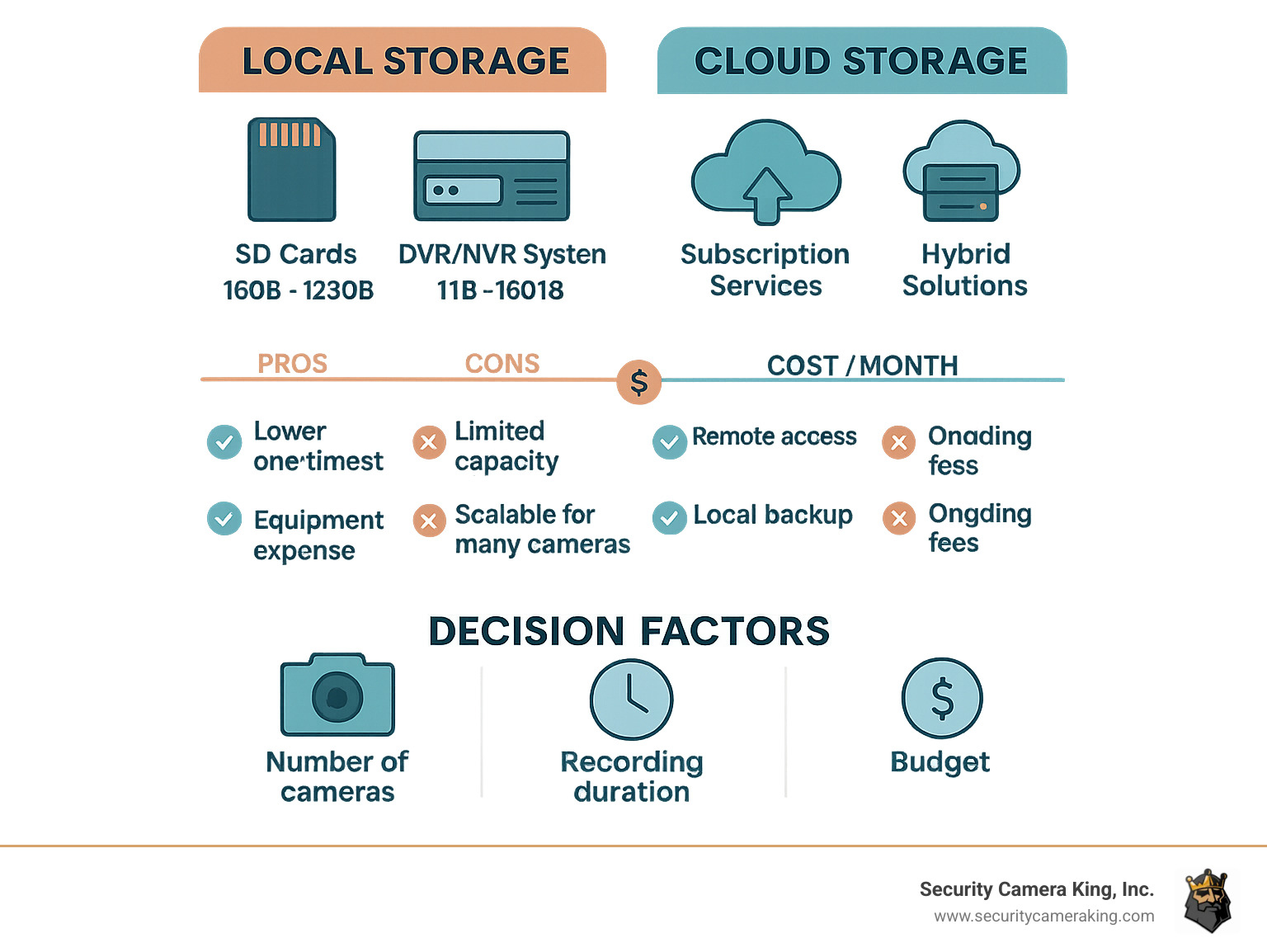
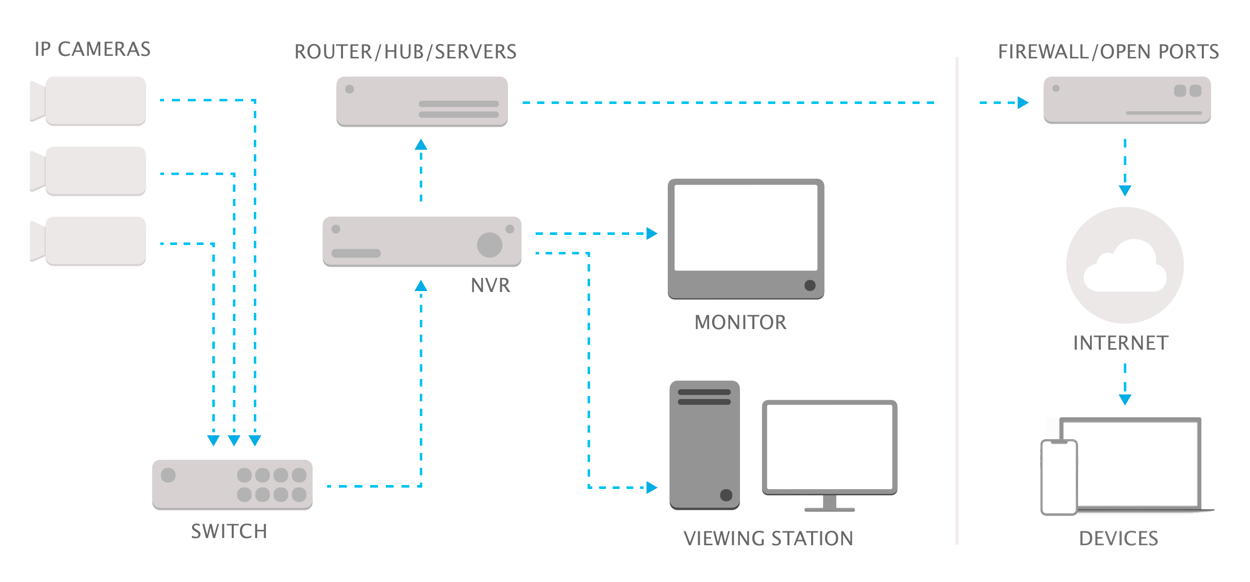
A Network Video Recorder (NVR) collects video from IP cameras and stores it. A local NVR is a box or server on site. It records to disks you own. A cloud NVR records to data centers over the internet. You use apps or a web portal to see streams and clips.
Local NVR vs cloud NVR is about where video lives and who runs the stack. Local NVR puts storage near the cameras. Cloud NVR puts storage in the cloud and shifts work to a service. Both can use motion rules, alerts, and AI, but they do it in different places.

Local NVR vs cloud NVR: key differences that matter
When I help teams compare Local NVR vs cloud NVR, I ask what matters most today and in two years. Use this list as a quick scan.
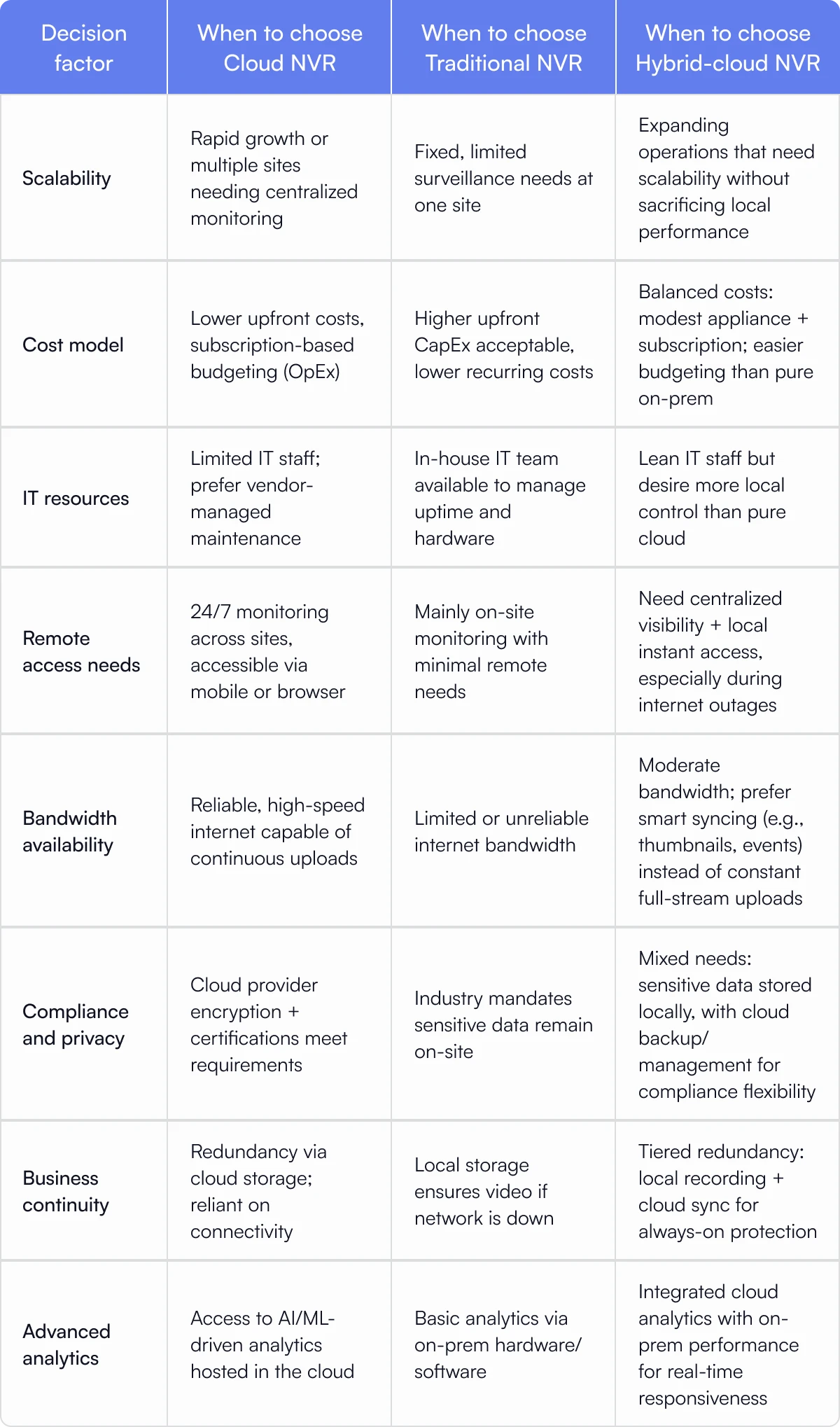
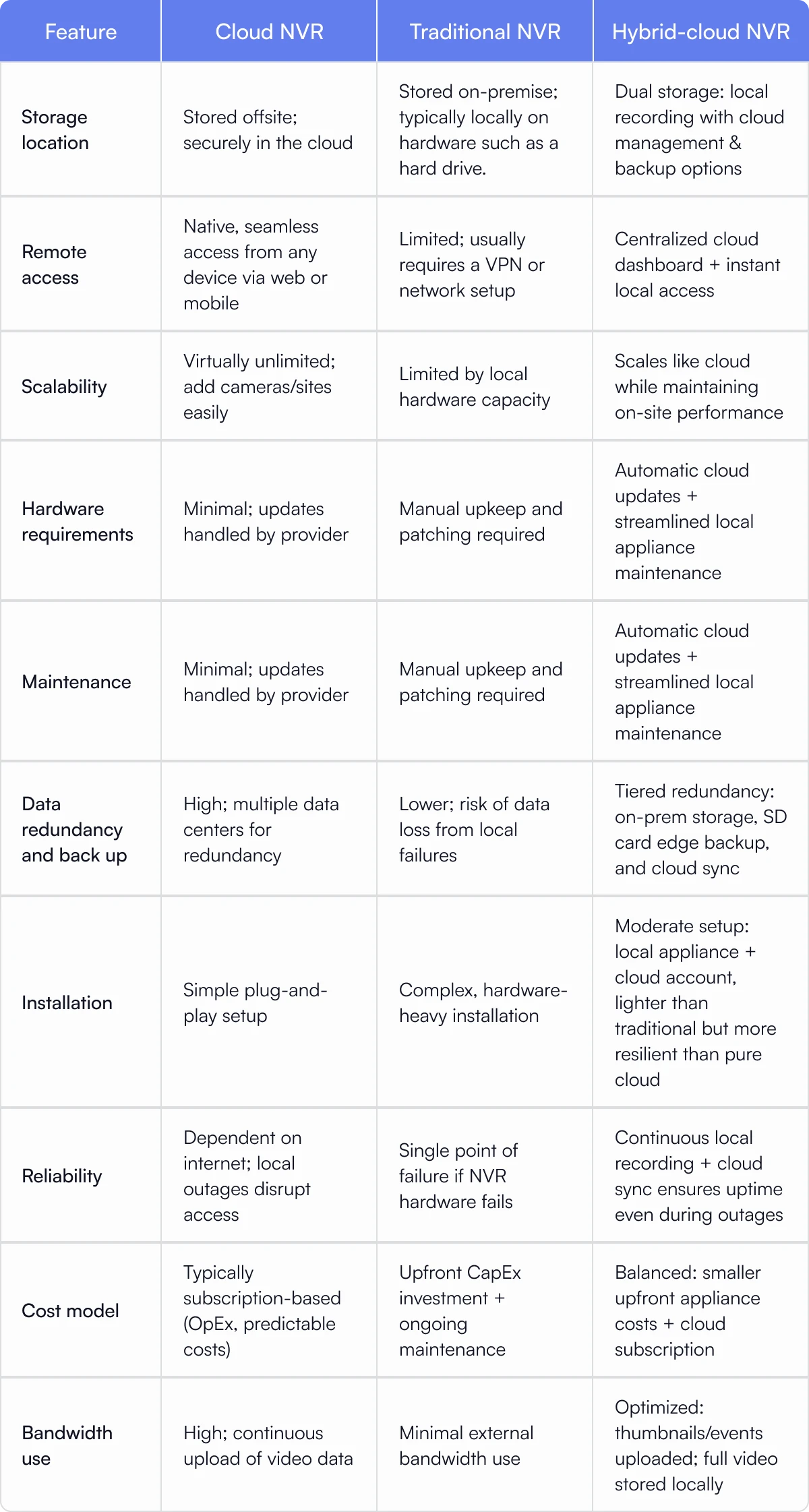
- Ownership and control: Local NVR gives full control of disks and network. Cloud NVR gives control through dashboards but storage sits off site.
- Bandwidth: Local NVR uses LAN bandwidth. Cloud NVR uses your upload link, which can be a choke point.
- Latency and smooth playback: Local is fast on site. Cloud is good for remote, but depends on your ISP.
- Uptime: Local NVR works during internet outages. Cloud NVR works across sites, but needs the internet.
- Security and privacy: Local keeps raw video inside your walls. Cloud adds strong encryption and access logs at scale.
- Scaling: Local needs more hardware as you add cameras. Cloud scales with a plan or tier.
- Cost model: Local is CapEx heavy and OpEx light. Cloud is OpEx with clear monthly fees.
- Maintenance: Local needs patching and disk swaps. Cloud pushes updates for you.
- Compliance and data residency: Local helps when rules require on‑prem storage. Cloud helps when you need audit trails and controls across many sites.
Cost breakdown and total cost of ownership
Local NVR vs cloud NVR costs vary with camera count, retention days, and video quality. You pay for more pixels and longer storage. Plan for both today and growth.
What you pay with a local NVR
- Hardware: NVR server or appliance, PoE switch, disks. Disks are the main cost.
- Setup: Rack, cabling, UPS, and time to tune streams and retention.
- Ongoing: Power, disk replacements every 3 to 5 years, firmware, and support.
What you pay with a cloud NVR
- Subscription: Per camera or per site, with retention tiers.
- Network: Better upload bandwidth may be needed.
- Optional: Cloud backup of critical cameras, or a small gateway device.
A simple example
- Ten 5 MP cameras at 15 fps for 14 days.
- Local NVR: One mid-range NVR and 8 to 12 TB disks. Higher cost up front, low monthly.
- Cloud NVR: A monthly fee per camera with 14-day storage. Low up front, easy to scale and budget.
Tip from the field: When budgets are tight, a hybrid model can cut cost. Keep 3 to 7 days on site for speed and 30 days in the cloud for incidents.
Security, privacy, and compliance
Local NVR vs cloud NVR security has trade-offs. Good security is a process, not a box.
Local NVR security
- You control the LAN, firewall rules, and who can touch the gear.
- Air-gapped or VLAN setups keep cameras isolated.
- The risk is weak passwords, old firmware, and open ports for remote access.
Cloud NVR security
- Strong encryption in transit and at rest is standard.
- Role-based access, audit logs, SSO, and MFA are built in.
- Data residency, retention, and legal hold features help with audits.
Compliance notes
- For HIPAA, PCI, GDPR, or CJIS, check data paths, keys, and retention.
- Ask for third-party audits and the shared responsibility model.
- Do a threat model for both Local NVR and cloud NVR. Write it down and test it.

Performance and reliability
Local NVR vs cloud NVR performance depends on networks, codecs, and camera settings. Small tweaks make big gains.
- Latency: Local viewing on LAN is near real time. Cloud adds internet hop time.
- Bandwidth: Set variable bitrate, smart codec, or substreams for cloud paths.
- Outages: Local NVR records during WAN loss. Some cloud NVRs also record at the edge and sync later.
- Retention: Higher resolution eats disk or cloud days. Pick the lowest resolution that still meets your needs.
A small rule that helps: record high quality on motion events, and keep a low quality continuous stream for context.
Scalability and integrations
Growth is where Local NVR vs cloud NVR can feel very different.
- Adding cameras: Local needs more disks and sometimes a new chassis. Cloud needs plan changes and maybe a new gateway.
- Multi-site: Local means site-by-site setup and VPNs. Cloud centralizes users, alerts, and health checks.
- Integrations: Both can use RTSP, ONVIF, and APIs. Cloud tools often ship with webhooks and easy app ties.
- AI analytics: Local NVR can run GPU boxes for detection. Cloud NVR can run managed analytics, which update over time.
From my work with large retail, a cloud-first stack made global tuning easy. We cut false alerts by half with fast rule pushes.

Use cases and what I recommend
This is how I map Local NVR vs cloud NVR to real needs.
- Home or small shop with slow internet: Local NVR first. Add cloud clips for critical doors.
- Single site office with IT support: Local NVR or hybrid. Keep 14 to 30 days on site.
- Multi-site retail or clinics: Cloud NVR for central control. Use gateways for on-site caching.
- Manufacturing with strict privacy: Local NVR with strong network rules. Add cloud health checks only if allowed.
- Remote sites with no IT: Cloud NVR with plug-and-play devices. Use LTE routers as backup links.
If you must choose one, write your top three risks on a whiteboard. Match them to Local NVR vs cloud NVR strengths and pick the model that removes the biggest risk first.
.png)
Real-world lessons and mistakes to avoid
These are patterns I see again and again.
- Do not ignore upload speed. Cloud NVR needs enough upstream. Use substreams and schedules to stay stable.
- Avoid open port forwarding. Use secure tunnels or vendor apps for remote access.
- Label cameras and keep a map. It saves hours during incidents.
- Monitor disk health. Replace drives before they fail. Use RAID only if you test rebuilds.
- Test restores. A backup is only real if you can restore fast.
Once, a team relied on a single 10 TB drive with no alerts. It failed the day before a theft review. Simple email alerts could have saved them.

Hybrid setups: the best of both worlds
A hybrid Local NVR vs cloud NVR approach can blend speed and scale.
- Local recorders handle 7 to 30 days for smooth review.
- Cloud stores key clips for high-risk zones for 90+ days.
- Cloud adds user management, SSO, and fleet health.
- Edge devices cache during outages and sync after.
I like hybrid for schools and warehouses. You get fast scrub on site and secure sharing with teams or law groups when needed.
Decision checklist for Local NVR vs cloud NVR
Use this quick list to reach a clear choice.
- How many cameras today and in 12 months?
- What retention do you need for each camera?
- How much upload bandwidth do you have at peak hours?
- Who will patch, monitor, and replace hardware?
- Do you need multi-site dashboards and SSO?
- What are your privacy and data residency rules?
- What is your budget split between CapEx and OpEx?
- How fast do you need remote access during an incident?
- What analytics do you need now and later?
- Do you need an air-gapped or offline mode?
Score each item from low to high impact. The pattern will point to Local NVR vs cloud NVR, or a hybrid.
Implementation steps and best practices
Follow these steps for a smooth rollout.
- Plan camera types, fields of view, and retention per zone.
- Right-size bandwidth and storage using a calculator.
- Segment camera networks and close inbound ports.
- Turn on MFA, SSO, and least-privilege roles for all users.
- Use motion zones and smart codecs to cut storage by half or more.
- Set health alerts for cameras, disks, and licenses.
- Document incident workflows and who to call after hours.
- Run a 14-day pilot on two or three cameras and review results.
- Train users on the player, exports, and legal holds.
- Review costs and settings every quarter and adjust.
Frequently Asked Questions of Local NVR vs cloud NVR
Which is more secure: local NVR or cloud NVR?
Both can be secure if set up well. Local reduces exposure, while cloud adds strong controls and logs. The weak link is often passwords and open ports.
Does cloud NVR need a lot of internet bandwidth?
It depends on camera count and quality. Use substreams, motion recording, and schedules to reduce upload use.
Can I mix local and cloud recording?
Yes, a hybrid model is common. Keep fast local storage and send key events or cameras to the cloud.
What happens if the internet goes down?
Local NVR keeps recording on the LAN. Some cloud systems buffer at the edge and sync later.
How do costs compare over three years?
Local is higher up front with lower monthly costs. Cloud is easier to budget with ongoing fees and fewer surprises.
Are AI analytics better on local or cloud?
Both can work well. Cloud models update faster, while local can keep data fully on site.
Can I reuse my existing cameras?
Most IP cameras that support RTSP or ONVIF will work. Check vendor lists for features like audio or PTZ.
Conclusion
Local NVR vs cloud NVR comes down to control, cost, and scale. Local gives speed, privacy, and offline strength. Cloud gives simple growth, remote access, and strong admin tools. Many teams win with a hybrid setup that blends both.
Make a short plan, run a small pilot, and measure results. Take the next step today: map your cameras, note your upload speed, and pick a 30-day trial. If you found this helpful, subscribe for more guides or leave a comment with your use case.