If you have a CCTV system, you might have heard about a CCTV power splitter cable. But what is it? And why do many people use it? In this article, we will explain everything in simple words. You will learn how this cable works and why it is important for your CCTV cameras.
What Is a CCTV Power Splitter Cable?
A CCTV power splitter cable is a special cable. It lets you share one power source with many CCTV cameras. Instead of using many power adapters, you use only one. This cable splits the power from one plug to many cameras.
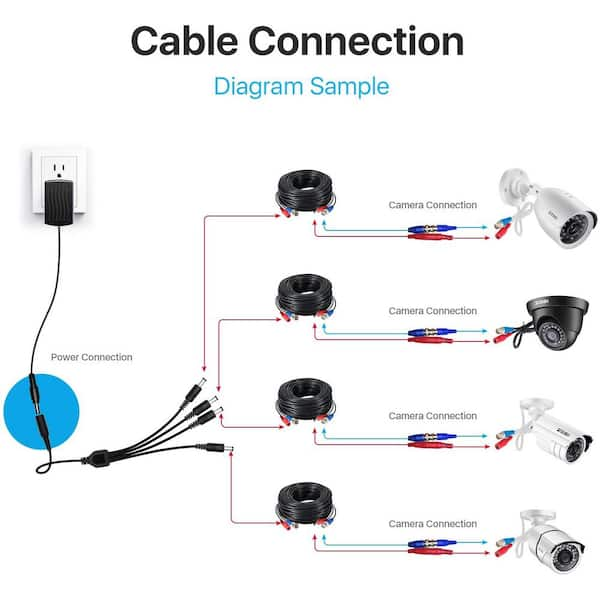
Imagine you have four cameras. Instead of plugging four power adapters in the wall, you use one adapter and a power splitter cable. The cable will send power to all four cameras at the same time.
How Does a CCTV Power Splitter Cable Work?
The cable has one input and many outputs. The input connects to the power adapter. The outputs connect to each camera. The cable sends power from the adapter to every camera. This way, all cameras get power and can work properly.
The splitter cable uses wires inside to share electricity. It does not change the power. It only splits it into many paths. The power must be strong enough for all cameras. If not, cameras may not work well.
Why Use a CCTV Power Splitter Cable?
There are many reasons to use a power splitter cable. Here are some important ones:
- Saves Money: You buy only one power adapter instead of many.
- Less Clutter: Fewer wires and plugs mean a cleaner space.
- Easy Installation: Connect one adapter and use the splitter cable to power all cameras.
- More Organized: It is easier to manage cables and power.
- Safer: Using one adapter with the right power is safer than many small adapters.
Types of CCTV Power Splitter Cables
There are different types of power splitter cables. The number of outputs changes depending on your needs. Here are some common types:
| Type | Number of Outputs | Use |
|---|---|---|
| 2-Way Splitter | 2 Outputs | For two cameras |
| 4-Way Splitter | 4 Outputs | For four cameras |
| 8-Way Splitter | 8 Outputs | For eight cameras or less |
You choose the splitter cable depending on how many cameras you have. It is important to get the right size for your system.
How to Choose the Right Power Splitter Cable
Picking the right cable is easy if you know some basics. Follow these steps:
- Count Your Cameras: Know how many cameras need power.
- Check Power Adapter: Make sure the adapter can give enough power for all cameras.
- Match Cable Outputs: Get a splitter cable with enough outputs for all cameras.
- Check Cable Quality: Use good quality cables to avoid power loss.
- Look at Connector Type: Make sure the cable connectors fit your cameras and adapter.
For example, if you have four cameras, use a 4-way splitter cable. Make sure your power adapter can support all four cameras’ power needs.
Credit: www.homedepot.com
How to Install a CCTV Power Splitter Cable
Installing the power splitter cable is simple. Follow these easy steps:
- Turn off the power adapter.
- Connect the input of the splitter cable to the power adapter.
- Connect each output of the splitter cable to each CCTV camera.
- Make sure all connections are tight and secure.
- Turn on the power adapter and check if all cameras work.
If all cameras turn on, the installation is successful. If not, check the connections and power adapter.
Important Tips for Using CCTV Power Splitter Cables
Here are some tips to get the best from your splitter cable:
- Use a Good Power Adapter: Choose one with enough power for all cameras.
- Do Not Overload: Do not connect too many cameras to one splitter if power is low.
- Check Cable Length: Long cables can lose power. Keep cables short if possible.
- Keep Cables Safe: Avoid bending or damaging the cables.
- Test Before Final Setup: Always test power before fixing cables permanently.

Credit: www.amazon.com
Common Problems and Solutions
Sometimes, people face problems with power splitter cables. Here are common issues and how to fix them:
| Problem | Possible Cause | Solution |
|---|---|---|
| Cameras Not Powering On | Loose connections or no power | Check all cable connections and power adapter |
| One Camera Not Working | Bad output port or cable | Try another port or replace the cable |
| Power Adapter Overheating | Adapter too weak for all cameras | Use a stronger power adapter |
| Flickering Cameras | Power loss in long cables | Shorten cables or use thicker cables |
Where to Buy CCTV Power Splitter Cables
You can buy power splitter cables in many places. Some options are:
- Online stores like Amazon or eBay
- Local electronics shops
- Special CCTV and security equipment stores
Before buying, check if the cable fits your cameras and power adapter. Read product descriptions carefully. Ask for help if you are not sure.
Frequently Asked Questions
What Is A Cctv Power Splitter Cable Used For?
A CCTV power splitter cable lets you power multiple cameras from one source.
How Many Cameras Can One Power Splitter Support?
Most splitters support 2 to 4 cameras with the same power supply.
Can A Power Splitter Cable Cause Power Loss?
Yes, slight power loss may occur but usually does not affect camera performance.
Is A Power Splitter Cable Easy To Install?
Yes, just connect the power supply to the splitter and then to cameras.
Conclusion
A CCTV power splitter cable is a useful tool. It helps you power many cameras from one adapter. This saves money, space, and makes installation easier. You only need to choose the right cable and power adapter.
Remember to check power needs and cable quality. Follow the installation steps carefully. This way, your CCTV system will work well and keep your property safe.
Now you know what a CCTV power splitter cable is. You can use this knowledge to make better choices. Keep your home or office secure with the right tools.