PIR detects warm bodies moving; pixel detection finds visual scene changes from video.
Picking the right system can save you time, money, and stress. In this guide on PIR motion sensor vs pixel motion detection, I break down how each method works, where they shine, and where they fail. I’ve built and tuned sensors for smart homes and cameras, and I’ll share real tests, mistakes to avoid, and simple steps you can use today.

What is a PIR motion sensor?
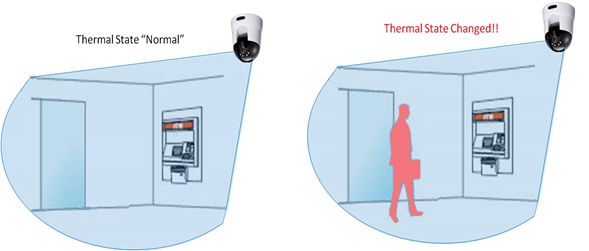
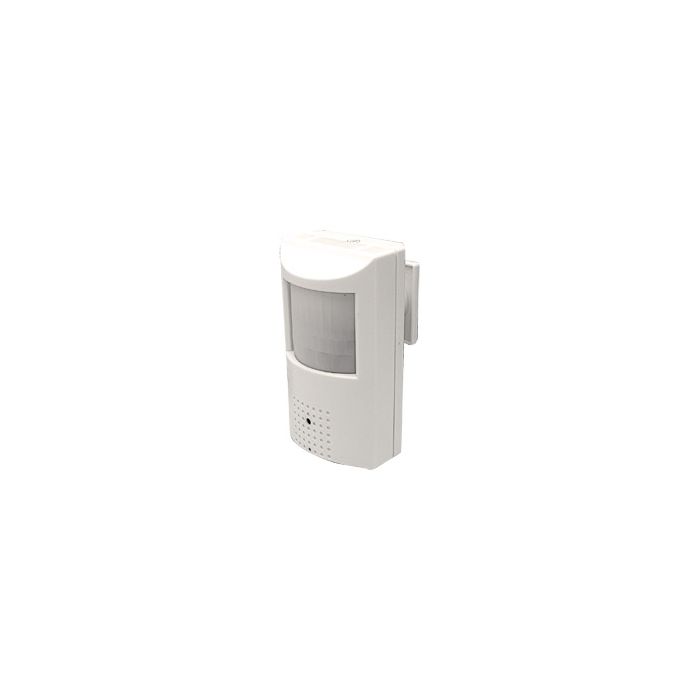
A PIR motion sensor, or passive infrared sensor, looks for changes in heat from people, pets, or cars. It does not send out energy. It reads infrared energy from the scene and triggers when a warm body moves across zones. The lens in front splits the view into many zones. This makes change easier to spot.
PIR is fast, cheap, and frugal with power. Many doorbells and battery cameras use PIR to wake the camera. Most PIR modules draw microamps at idle and trigger within a second. They work well in the dark since heat is the signal, not light.
There are limits. PIR does not “see” still people or slow moves straight at the sensor. It may miss a person creeping along a wall. Hot air from vents, sun-heated cars, or pets near a heater can cause false alerts. Range is often 16 to 39 feet, with a cone of 90 to 120 degrees.
-
Core strengths
- Low power use and long battery life.
- Good at night and in low light.
- Fewer false alerts from light or shadows.
-
Core limits
- Only detects warm bodies in motion.
- Blind to non-thermal motion like paper or shadows.
- Can be fooled by heat sources and wind on hot days.
What is pixel motion detection?
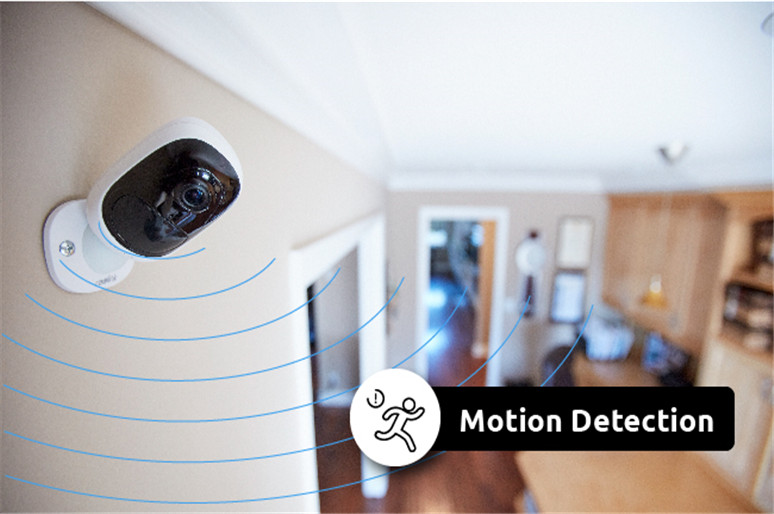
Pixel motion detection runs on a camera feed. The system compares frames and looks for pixel changes over time. If enough pixels change, it marks motion. Many cameras add smart zones and sensitivity sliders. Some pair it with AI to classify people, pets, or vehicles.
Pixel motion detection can see almost any visual change. It can spot a package moved on a porch or a door that opens. It can track motion shape and direction. It can also work through glass, which PIR cannot.
But it can trigger too much. Shifting light, clouds, rain, snow, bugs, and tree branches can set it off. It also uses more power and compute. On a battery camera, it may cut battery life unless tuned well or paired with PIR.
-
Core strengths
- Detects many kinds of motion, not just heat.
- Works through windows and supports zones.
- Can pair with AI to filter objects.
-
Core limits
- Sensitive to light and weather changes.
- Higher power use and processing needs.
- Needs good image quality and stable mounts.

PIR motion sensor vs pixel motion detection: key differences that matter
When I compare PIR motion sensor vs pixel motion detection, I focus on signal type, noise, and cost. That is what most buyers care about day to day. Here is how they differ in practice.
-
Signal source
- PIR reads heat changes from warm bodies. It ignores most light changes.
- Pixel motion detection reads visual changes in the image. It cares about light, color, and motion.
-
False alerts
- PIR resists shadows and headlight sweeps. Heat sources can still trigger.
- Pixel motion detection sees shadows, rain, bugs, and tree sway as motion unless filtered.
-
Power and speed
- PIR is ultra low power and fast to wake a system.
- Pixel motion detection can be fast but needs compute and drains batteries more.
-
Day and night
- PIR is strong at night and in dark halls.
- Pixel motion detection needs good IR light or ambient light to see.
-
Privacy
- PIR does not record video to detect motion, which helps privacy.
- Pixel motion detection uses camera frames, so manage storage and access.
-
Through glass
- PIR does not work through glass.
- Pixel motion detection works through glass since it is visual.
-
Pets and wildlife
- PIR can be tuned to ignore small warm bodies with the right lens and height.
- Pixel motion detection can ignore small motion with zones and AI, but trees and bugs are tricky.
In short, PIR motion sensor vs pixel motion detection is a trade-off. PIR is simple, private, and power-friendly. Pixel motion detection is flexible, rich in data, and easy to set up in software. Many of the best systems now mix both.
When to choose each: real-world use cases
From years of installs, I use a simple split. Think about location, power, and what you want to catch. Then pick the tool that cuts false alerts and saves time.
-
Choose PIR motion sensors when
- You need long battery life on a doorbell or outdoor camera.
- You want strong night detection in dark areas.
- You have moving lights, car headlights, or shifting shadows.
-
Choose pixel motion detection when
- You want to see non-thermal changes like a package moving.
- The sensor must work through a window or glass door.
- You plan to use AI to tag people, pets, or vehicles.
-
Combine both when
- You want low false alerts and rich video events.
- You can let PIR wake the camera, then use pixel or AI to confirm.
- You monitor busy scenes like sidewalks or tree-lined yards.
Common setups I like
- Battery camera on a porch: use PIR to wake, pixel detection to confirm a person.
- Indoor hallway: PIR for lights, no camera needed, for better privacy.
- Garage or warehouse: pixel detection with zones and AI, plus a PIR at doors for fast alerts.
This mix cuts noise and keeps power use low. It is the best of both worlds in the PIR motion sensor vs pixel motion detection debate.

How they work under the hood
Understanding the core helps you tune each tool. You do not need to be an engineer to get the gains.
PIR basics
A PIR uses a pyroelectric element and a Fresnel lens. The lens splits the scene into zones. When a warm body crosses zones, the sensor sees a change and triggers. Most modules add a hold time and a sensitivity knob. This avoids rapid flicker and lets you tune range.
Typical specs
- Range: 16 to 39 feet.
- Field of view: 90 to 120 degrees.
- Trigger time: 0.2 to 1 second.
- Idle current: microamps to low milliamps.
Pixel detection basics
Pixel motion detection does frame differencing. It looks at new frames and compares them with a prior frame. It counts pixels that changed. If the count passes a set threshold, it triggers. You can set zones, mask areas, and adjust sensitivity. With AI, the system can ignore motion unless it looks like a person or a vehicle.
Typical specs
- Trigger time: tied to frame rate and compute, often 0.1 to 0.5 seconds.
- Needs stable frames and steady lighting.
- Works best with fixed cameras and low vibration.
Both methods have failure modes. Knowing them lets you fix them fast.

Field notes: what worked for me, and what did not
I learned a lot from porch cams and shop floors. Here are lessons from real setups.
- PIR placed near a dryer vent gave late-night ghost alerts. Moving the sensor three feet away fixed it.
- Pixel motion detection on a porch facing trees blew up my phone on windy days. I drew tight zones and set a higher threshold. That cut false alerts by about three quarters.
- A battery doorbell with PIR-first wake saved charge. The same doorbell on pixel-only ran out twice as fast.
- In a dim stairwell, PIR never missed a person. Pixel motion detection struggled until I added a small night light.
What to avoid
- Do not point PIR at hot metal roofs or HVAC exhausts.
- Do not let pixel detection watch shiny floors with sun streaks.
- Do not mount cameras where they shake. Vibration looks like motion.
What to try
- Use PIR to wake, then use AI to confirm. This is my default for busy streets.
- Use schedules. Turn down sensitivity at times with known traffic.
- Test for a full week. Review alerts and adjust once.
This is the practical side of PIR motion sensor vs pixel motion detection. Small tweaks give big wins.
Tuning tips to cut false alerts
A few careful steps make either method shine. Use them as a checklist for setup day.
For PIR motion sensors
- Mount height around chest level for most people.
- Aim across walk paths, not straight at them.
- Keep away from vents, heaters, and direct sun.
- Use the right lens pattern for pets and room size.
For pixel motion detection
- Set zones to exclude trees, sky, and busy roads.
- Increase motion threshold so small flickers do not trigger.
- Use AI filters for person, pet, and vehicle where available.
- Add steady IR light at night to reduce noise.
For both
- Secure mounts. Even small shakes cause false motion.
- Review a week of clips. Tune with data, not guesses.
- Update firmware. Vendors often fix motion bugs.
These steps narrow the gap in PIR motion sensor vs pixel motion detection. They also save you from alert fatigue.

Privacy, data, and energy use
Privacy matters. PIR keeps data light. It can trigger a light or a chime with no video at all. That is useful in bedrooms, halls, and offices.
Pixel motion detection lives in the video stream. Be clear with guests and staff if you record. Use local storage when you can. Limit who can view clips. For shared homes, place cameras in common areas, not private rooms.
Energy is part of the choice. PIR is the clear winner for low power. Pixel motion detection can still be efficient on wired cams or with smart wake modes. In the PIR motion sensor vs pixel motion detection choice, consider both the power bill and your privacy goals.

Cost, integrations, and future trends
PIR modules cost little and work with many hubs. They pair well with Zigbee, Z-Wave, and simple relays. You can add many PIR units without a large budget.
Pixel motion detection comes with the camera. The cost is in storage, cloud plans, and sometimes AI features. On the upside, you get rich data and software updates that improve over time.
Trends I see
- More dual-trigger systems: PIR for wake, AI for confirm.
- Better on-device AI with low power chips.
- Smarter masking that auto-learns stable zones.
In short, the PIR motion sensor vs pixel motion detection story is moving toward hybrid systems. That is good for users. You will get fewer false alerts and better context.
Frequently Asked Questions of PIR motion sensor vs pixel motion detection
Is PIR better than pixel motion detection for outdoors?
PIR is great outdoors when heat contrast is clear and power is limited. Pixel motion detection works too but needs tight zones to avoid trees and headlights.
Can pixel motion detection replace PIR on a battery camera?
It can, but battery life may drop. Many battery cameras use PIR to wake and pixel detection or AI to confirm to save power.
Does PIR work through glass?
No, PIR cannot see motion through glass. Pixel motion detection can work through windows since it reads visual changes.
Which is more private: PIR or pixel motion detection?
PIR is more private because it does not need video. Pixel motion detection uses frames, so manage who can view clips and how long you store them.
How do I reduce false alerts on pixel motion detection?
Draw small detection zones, raise the motion threshold, and use AI filters. Add steady lighting at night and secure the camera mount.
Will a small pet trigger PIR?
It can, but you can mount higher and use a pet-immune lens to reduce triggers. Pixel motion detection can also filter pets with AI on some systems.
What is the best setup for a front porch?
Use PIR to wake fast and save battery. Then use pixel motion detection with person-only AI to confirm and record useful clips.
Conclusion
Think about what you need to catch, where you install, and how you power it. PIR gives fast, low power, and private motion sensing. Pixel motion detection gives rich detail, zones, and AI filters. In many homes and shops, a blend of both is best.
Take one area in your space and try a hybrid setup this week. Use PIR to wake, and let pixel or AI confirm. Tune zones, review alerts, and adjust once. If this helped, subscribe for more smart security guides or drop a question in the comments.