IP cameras beat analog CCTV on quality, features, and flexibility for most users.
Choosing between CCTV vs IP camera can feel confusing and urgent. I set up systems for homes, stores, and warehouses. I know the pain of grainy video, slow apps, and missed footage. In this guide, I break down cctv vs ip camera in plain words. You will see what matters, what to skip, and how to buy with confidence.

What do CCTV and IP camera really mean?
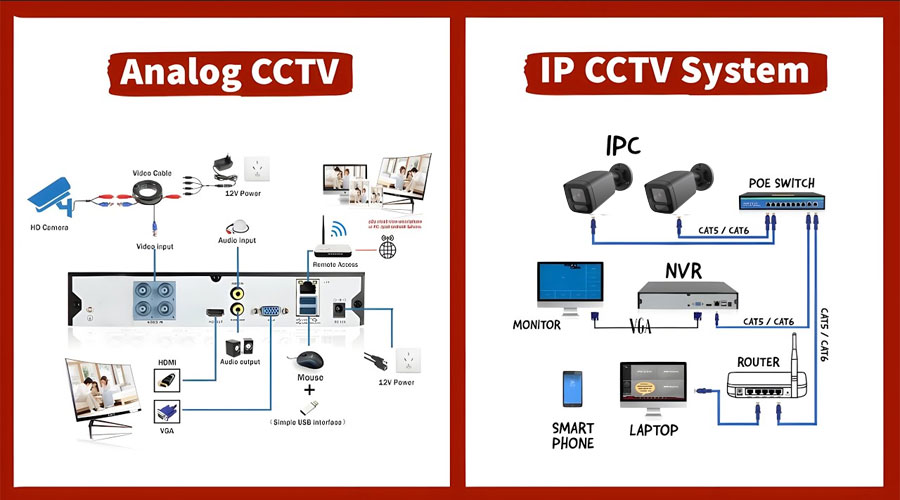
CCTV is the old-school analog system. The camera sends video over coax cable to a DVR. The DVR records and lets you view the footage. It works offline and is simple.
An IP camera is a network device. It sends digital video over Ethernet to an NVR or a server. Many also work with cloud storage. They support features like smart alerts and remote access.
In real jobs, I see both in use. The right pick depends on your site, budget, and risk level. We will compare cctv vs ip camera point by point.
CCTV vs IP camera: key differences that matter
- Image quality. IP cameras lead in resolution, clarity, and night detail.
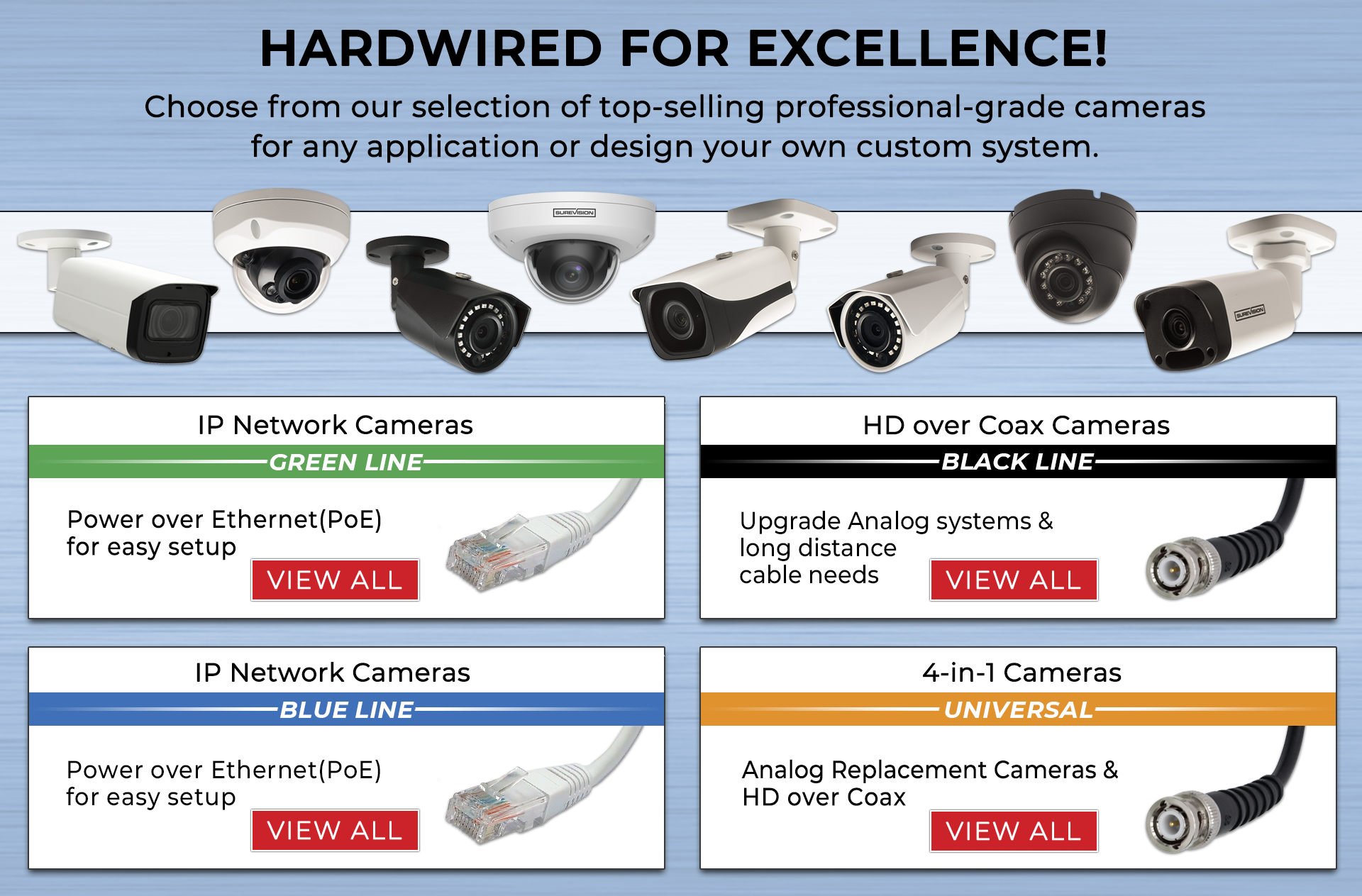
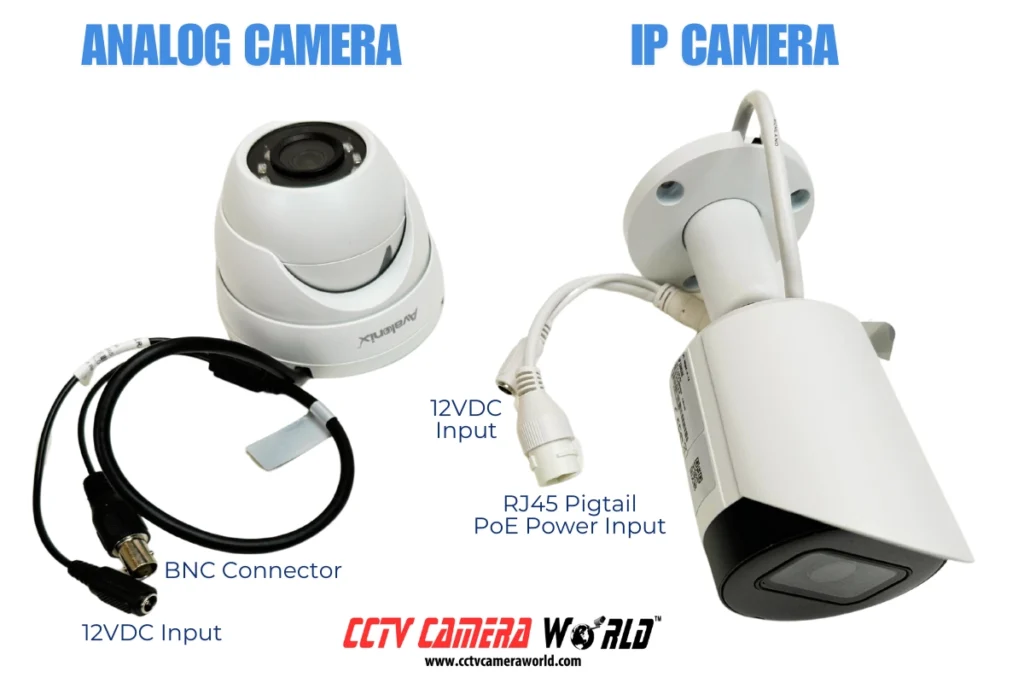
- Cabling. CCTV uses coax. IP uses Ethernet and often PoE for power.
- Smart features. IP supports analytics like people, vehicle, and package detection.
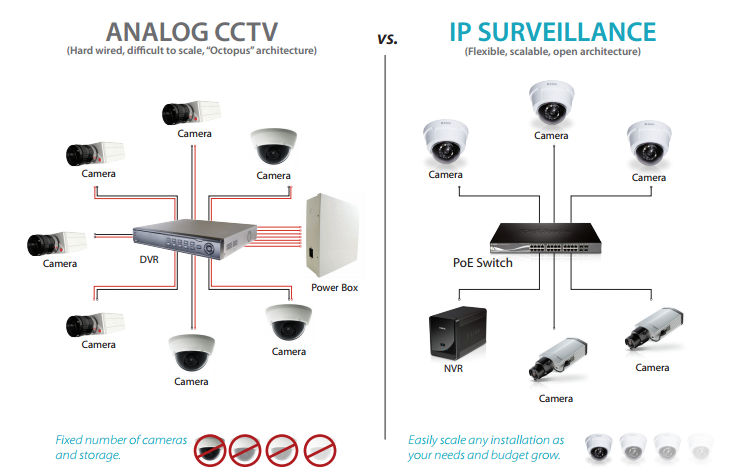
- Scalability. IP grows easier and handles many cameras on one network.
- Cost. CCTV gear is cheap upfront. IP wins on long-term value.
- Remote access. Both can do it. IP is smoother and more secure when set right.
- Cyber risk. IP must be secured like any network device. CCTV is less exposed offline.
If you want a quick rule for cctv vs ip camera, go IP for new installs. Keep CCTV if you already have coax and need a fast, low-cost fix.
Pros and cons of analog CCTV
CCTV pros:
- Lower upfront cost for basic systems.
- Works fine without internet. Good for closed sites.
- Uses existing coax runs in many older buildings.
- Simple to set up for small jobs.
CCTV cons:
- Lower resolution and dynamic range in most cases.
- Harder to scale. Each run needs home-run cabling.
- Fewer smart alerts. More time spent scrubbing footage.
- Audio and power need extra parts or Siamese cable.
- Remote use can be clunky.
I still use CCTV when a client has good coax in place and needs two or three cameras fast.

Pros and cons of IP camera
IP camera pros:
- Sharper video. 2K, 4K, and better night color options.
- One cable with PoE. Easy to add or move cameras.
- Smart detection. Fewer false alerts and faster search.
- Open standards like ONVIF. More choice in brands.
- Better remote access and cloud options.
IP camera cons:
- Needs basic network setup skill.
- Cybersecurity matters. You must patch and harden.
- Switches and NVRs can add to cost.
- Wi-Fi models can lag if the network is weak.
In my installs, IP cuts total time spent on incident review. That wins trust fast.
Video quality, compression, and lenses
Resolution is only one part. Clarity also needs good sensors, lenses, and processing.
- Compression. H.265 saves space over H.264 but needs more CPU. Newer codecs can help on bandwidth too.
- Dynamic range. Look for WDR to handle sun and shadows.
- Night vision. Better IR, large sensors, or low-light color modes help a lot.
- Lenses. Varifocal lets you frame the scene right. A wrong lens ruins great specs.
For cctv vs ip camera, IP gives you more control on these pieces. That is why IP shines for tricky light scenes.

Networking, cabling, and power
CCTV wiring is simple: coax to DVR, power to camera. Baluns can push analog over Ethernet, but quality may drop.
IP cameras use Ethernet. PoE can deliver power and data on one cable. This makes installs fast and neat. You can use a PoE switch near cameras to cut long runs.
Tips I use on every job:
- Label every run at both ends.
- Use Cat6 for longer or future-proof runs.
- Keep cable away from strong power lines.
- Test every drop with a simple cable tester.
For cctv vs ip camera, IP wins on neat cabling and future upgrades.
Storage, bandwidth, and remote access
Storage depends on bitrate, not just resolution. Use VBR with a cap to balance space and quality.
- Local storage. DVR/NVR is reliable and cheap per TB.
- Edge storage. Many IP cameras support microSD for backup.
- Cloud. Great for off-site safety. Watch the monthly cost.
- Bandwidth. Record at full quality on LAN. Limit remote streams to save data.
Set motion zones and smart rules. You store less noise and find events fast. This is a big win for IP in the cctv vs ip camera debate.

Cybersecurity, privacy, and compliance
IP cameras are network devices. Treat them with care.
- Change default passwords and use long, unique ones.
- Keep firmware updated on cameras, NVR, and switches.
- Use VLANs to isolate cameras from guest Wi-Fi.
- Disable risky services you do not need.
- Use HTTPS and SRTP if supported.
- Limit remote access using VPN or zero trust tools.
- Check your local laws on audio, signage, and data storage.
CCTV can be safer by design when fully offline. But many people still connect DVRs to the internet. That has risks too. In cctv vs ip camera, both can be safe if you plan well.

Cost breakdown and total cost of ownership
Upfront, a basic 4-channel analog kit costs less than an IP kit. But think in years, not months.
Costs to consider:
- Cameras, DVR/NVR, storage drives.
- Cables, PoE switch or power supplies, mounts.
- Labor for pulling cable and setup.
- Ongoing time to review and maintain.
- Security updates and support.
IP can save time with better search and alerts. That time is money. Over three to five years, I see IP often win on total cost in most small to medium sites.
Use cases and real-world picks
Home users:
- Want clear faces and plates near doors and driveways.
- IP with 4MP or 8MP, PoE, and smart alerts works well.
Small shops:
- Need quick search for slips and theft.
- IP NVR with analytics and a PoE switch is my go-to.
Warehouses:
- Long runs and many cameras.
- IP with fiber uplinks and distributed PoE switches keeps it clean.
Upgrades on a budget:
- Keep coax and use analog to IP hybrids or HD-over-coax if needed.
- Plan a future move to full IP.
When I compare cctv vs ip camera on site, I map the risks first. Then I match the tech to the risks, not the other way around.
How to choose: a simple decision guide
- Count your key scenes. Doors, cash wrap, lot, fence line.
- Pick the must-have details. Face, plate, or just motion.
- Check the cable paths. Ethernet or coax present?
- Define storage days. 14, 30, or 90 days?
- Set a budget with a 15% buffer.
- Choose IP if starting fresh or you need smart tools.
- Consider CCTV if you must reuse coax now.
Write these down. It keeps cctv vs ip camera choices clear and calm.
Setup tips and best practices
- Mount at the right height. Chest to head level for faces.
- Avoid pointing at the sun or bright glass.
- Use varifocal lenses to frame tight, not wide and vague.
- Name each camera by location.
- Test night scenes before you sign off.
- Back up the NVR config file after setup.
- Document passwords in a safe place.
These steps save hours later. They also boost trust in your system.
Future trends in security cameras
- AI at the edge. Better object and behavior alerts with less false noise.
- Higher efficiency codecs. Lower storage for the same quality.
- Cloud and hybrid models. Mix of local and cloud for resilience.
- Privacy-first features. Masking, retention rules, and audit logs.
- Interop. Better ONVIF and open APIs for one view of many brands.
These trends push the cctv vs ip camera gap wider. IP is set to lead for years.
Frequently Asked Questions of cctv vs ip camera
Which is better for home: CCTV or IP camera?
IP cameras are better for most homes. They offer clearer video, smart alerts, and easy remote viewing.
Can I mix CCTV and IP cameras in one system?
Yes, with hybrid DVRs or NVRs that support both. Another option is using encoders for analog cameras.
Do IP cameras need the internet to record?
No, they can record to an NVR on a local network. Internet is only needed for remote viewing or cloud backup.
How much bandwidth do IP cameras use?
A 4MP camera can use 2–6 Mbps depending on settings. Use H.265, VBR, and smart motion to cut bandwidth.
Are IP cameras safe from hacking?
They can be safe if you harden them. Use strong passwords, firmware updates, VLANs, and VPN-only remote access.
Can I upgrade my old CCTV to IP without new cables?
Sometimes. You can use Ethernet over coax adapters or HD-over-coax for a partial step. Still, fresh Cat6 is best when you can.
What storage do I need for 30 days of video?
It depends on camera count and bitrate. A typical small site with four 4MP cameras may need 4–8 TB for 30 days with motion recording.
Conclusion
You now have a clear view of cctv vs ip camera. Analog works for fast, low-cost fixes, but IP wins on quality, smarts, and growth. Map your scenes, set your goals, and pick the gear that fits the risk.
Take the next step today. List your must-capture moments, choose two camera locations, and price both options. Want more practical tips? Subscribe for guides, or drop a comment with your site layout and I will help you plan.